Using Email Filters
|
Inbox |
|
Filters |
IMPORTANT NOTE TO LINUX USERS: All drop-downs are mouseover-based. If you are using Linux operating systems, you may need to access IE to get the mouseover aspect to work!
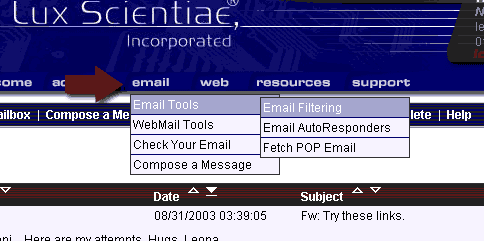
Set up email filters by going to the top menu and selecting email: Email Tools: Email Filtering.
IMPORTANT NOTE: All drop-downs are mouseover-based. If you are using Linux operating systems, you may need to access IE to get the mouseover aspect to work!
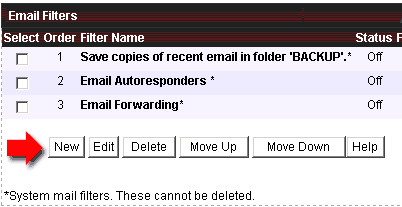
Next, click on the button that says New.
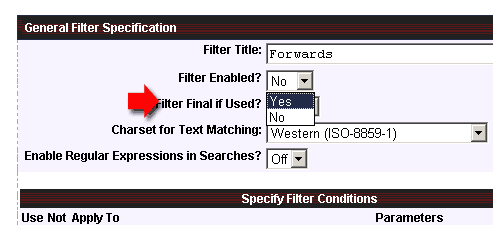
Give a name to the filter. Then select Filter Enabled? YES
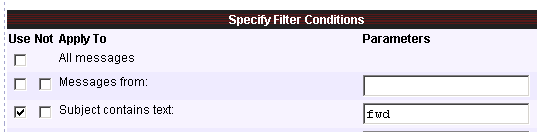
Check the box marked 'use' to choose which email information you want your filter to apply to. I.e., if you want to block all forwards, mark as in the illustration. If you're forwarding to another email address, you'll mark 'All Messages'. If you want to block a specific email address, you'd fill in the Messages From field with the .
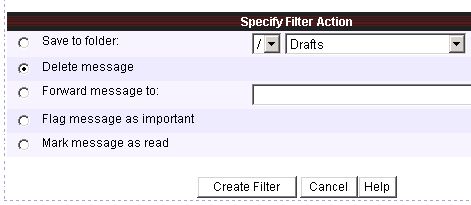
Scroll to the bottom and choose what action you want the filter to take with the messages, then click on 'Create Filter.